Ο Emanuele Lecchi έχει φτιάξει κάποια πολύ ενδιαφέροντα scripts για το 3ds Max και τον V-Ray. Αυτό που έχουμε δοκιμάσει με εξαιρετικό αποτέλεσμα είναι η μετατροπή της κανονικής κάμερας του 3ds Max ή μιας προοπτικής άποψης σε V-Ray physical camera. Το script αυτό είναι πολύ χρήσιμο στην περίπτωση που χρησιμοποιηθούν τα Camera match utilities του Max για την προσαρμογή μιας εικόνας στο viewport, μετά το perspective match τρέχοντας το script δημιουργείται αυτόματα μια V-Ray physical camera στην σωστή θέση και με τις σωστές ρυθμίσεις.
Κατέβασμα από το scriptspot:
http://www.scriptspot.com/3ds-max/scripts/leles-vray-tools
Mr. Emanuele Lecchi has created some very interesting scripts for 3ds Max and V-Ray. What we have tried to excellent effect is the conversion of 3ds Max camera and/or perspective view to V-Ray physical camera. This script is very useful if you use the Camera match utilities of Max for adjusting an image in the viewport, when perspective match is done running the script automatically creates a V-Ray physical camera at the right position along with the correct settings.
Download from scriptspot:
http://www.scriptspot.com/3ds-max/scripts/leles-vray-tools
Δευτέρα 23 Ιουνίου 2014


Παρασκευή 9 Μαΐου 2014
Autodesk 360
Άλλη μια παρόμοια υπηρεσία με τα Google Drive - Dropbox ξεκινάει αυτή τη φορά από την Autodesk. Ονομάζεται Autodesk 360 και δεν απαιτείται προς το παρόν τουλάχιστον subscripton για να χρησιμοποιήσει κανείς την υπηρεσία, αν παρόλα αυτά έχει τότε του δίνονται extra benefits. Ο χώρος αποθήκευσης αγγίζει τα 5Gb, η ειδοποιός διαφορά όμως είναι ότι μπορείς να ανοίξεις, να μετρήσεις, να περιστρέψεις, ακόμη και να διορθώσεις τα σχέδια χωρίς τη χρήση κάποιου λογισμικού καθώς γίνονται όλα online, ενώ υπάρχει και η δυνατότητα ενεργειακής ανάλυσης, στατικής ανάλυσης, φωτορεαλισμού κλπ. Επίσης το σύστημα υποστηρίζει tablets και smart phones.

Another
Google drive - Dropbox style service comes into play this time from Autodesk.
We call it Autodesk 360 and it is free so you don’t need an Autodesk
subscription to create an account and use the services, but if you have one you
get extra benefits. The storage capacity is good and
tops at 5GB. The big difference though is that you can open, print, markup and
measure your drawings while online without the need of installed software, and
it gets even better, you can create simulations, photorealistic visualizations,
even editing functions on the fly, as it also supports mobile devices like
smart phones and tablets. The interface is quite simple so we put it to the
test with no drawbacks till now.
Τρίτη 1 Απριλίου 2014
Revit 2015
Κυκλοφόρησε η καινούρια έκδοση του Revit 2015 η οποία θα είναι σε λίγο καιρό διαθέσιμη και στην ιστοσελίδα της Autodesk. Ανάμεσα στα νέα χαρακτηριστικά ξεχωρίζουμε το multiple trim με crossing window, τον δεσμό με ifc αρχείο, τις βελτιωμένες προμετρήσεις-φίλτρα βάσει base και top constrain και την αλλαγή (επιτέλους) του κειμένου grand totals! Αναλυτικά τα νέα χαρακτηριστικά τα βλέπετε εδώ: http://www.autodesk.com/products/autodesk-revit-family/features/software-for-bim/new/gallery-view
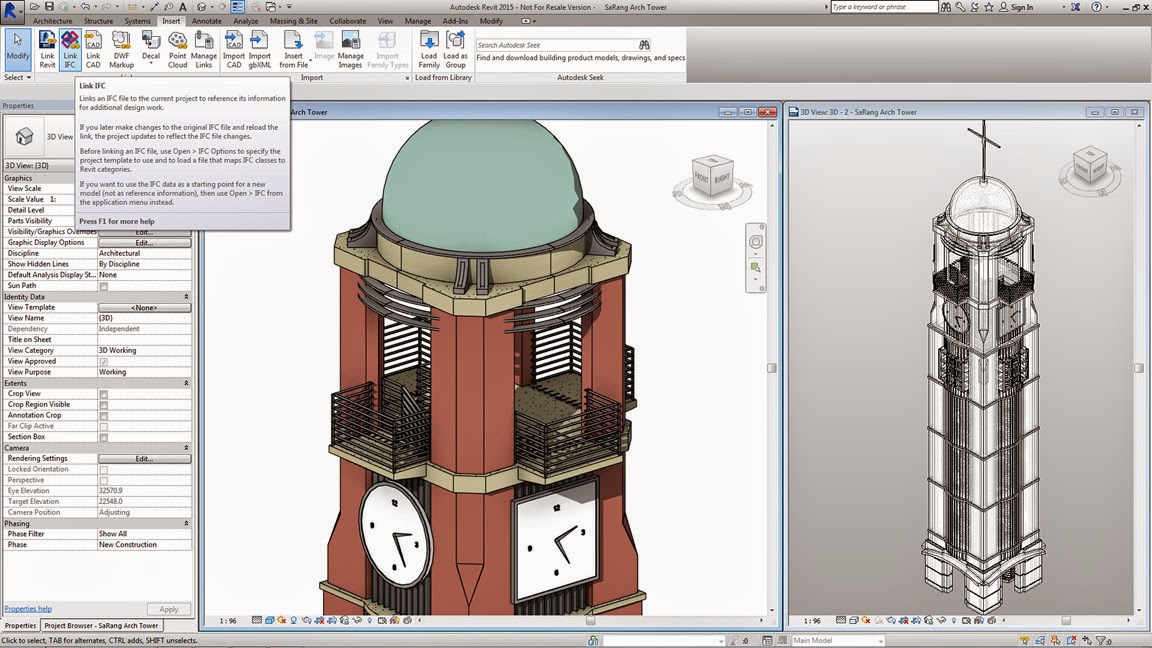
Revit 2015 is out and it will be shortly available on the Autodesk website. Some of the new features are the multiple trim available with crossing window, the ifc link, improved schedule filtering on base and top constrains and (finally) customizable grand totals text! Details for the new features are published here: http://www.autodesk.com/products/autodesk-revit-family/features/software-for-bim/new/gallery-view
Revit 2015 is out and it will be shortly available on the Autodesk website. Some of the new features are the multiple trim available with crossing window, the ifc link, improved schedule filtering on base and top constrains and (finally) customizable grand totals text! Details for the new features are published here: http://www.autodesk.com/products/autodesk-revit-family/features/software-for-bim/new/gallery-view
Τρίτη 11 Μαρτίου 2014
Αναβάθμιση παλαιών αρχείων με τον Revit File Upgrader
Για να μην καθυστερεί κανείς με τις αναβαθμίσεις των παλαιών Revit αρχείων κάθε φορά που ανοίγει ένα από αυτά στην τρέχουσα έκδοση μπορεί να χρησιμοποιήσει τον revit upgrader και να κάνει συνολική αναβάθμιση σε όλα τα rvt αρχεία, στα template files και στα family files. Ο upgrader είναι δωρεάν στην ιστοσελίδα autodesk exchange/apps.

In order not to delay with upgrading one by one existing Revit files to the current version, one can use the revit upgrader and proceed with a batch upgrade of the rvt, template and family files. The upgrader is free on autodesk exchange / apps website.
In order not to delay with upgrading one by one existing Revit files to the current version, one can use the revit upgrader and proceed with a batch upgrade of the rvt, template and family files. The upgrader is free on autodesk exchange / apps website.
Κυριακή 23 Φεβρουαρίου 2014
V-Ray 3.0 is out
Κυκλοφόρησε η τρίτη έκδοση του V-Ray renderer με κύριο χαρακτηριστικό στο θέμα της βελτιωμένης ταχύτητας την κατ΄επιλογή χρήση του Embree raytracer. Για να ενεργοποιήσει κάποιος την χρήση του Embree πρέπει να πάει στο render setup-settings-advanced-use Embree. Στις δοκιμές που έκανα εγώ σε διάφορες σκηνές είδα βελτίωση γύρω στο 10% χωρίς καμία πτώση στην ποιότητα της εικόνας. Για να λειτουργήσει ο Embree απαιτούνται επεξεργαστές intel αφού εξάλλου η intel τον εξελίσσει.

Τhe third V-Ray renderer version has released with improved speed by the use of Embree raytracer. To enable the Embree raycaster one has to go to render setup-settings-advanced-use Embree checkbox. During the testing i have done in various scenes i saw improvement of around 10% with no drop in image quality. Intel processors are required for this intel product.
Τhe third V-Ray renderer version has released with improved speed by the use of Embree raytracer. To enable the Embree raycaster one has to go to render setup-settings-advanced-use Embree checkbox. During the testing i have done in various scenes i saw improvement of around 10% with no drop in image quality. Intel processors are required for this intel product.
Πέμπτη 13 Φεβρουαρίου 2014
Revit shortcuts - συντομεύσεις πληκτρολογίου
Για να διαχειριστούμε τις συντομεύσεις στο Revit πηγαίνουμε στο ribbon-manage-macro security-user interface- keyboard shortcuts- customize...και ορίζουμε αυτά που θέλουμε, εγώ τοποθετώ στο ctrl-2 τον project browser, πάει παρέα με το ctrl-1 του properties.
Παρακάτω παραθέτω κάποια από τα default shortcuts που είναι πολύ χρήσιμα κατά την διάρκεια της σχεδίασης, οι συντομεύσεις δουλεύουν μόνο στα αγγλικά:
TR - Trim, AL - Align, HH - Hide element, HR - Hide restore, HC - Hide category, HI - Isolate element, IC - Isolate category, ZA - Zoom all, ZZ - Zoom window, VV - Visibility graphics, TL - Thin lines, PP - Properties, DI - Aligned dimension, MV - Move, SZ - Close loop, Delete - Delete
In order to manage the Revit shortcuts we go to ribbon-manage-macro security-user interface-keyboard shortcuts-customize ... and define what we want, I posit ctrl-2 for the project browser, which goes alongside with ctrl-1 of properties.
Below I quote some of the default shortcuts that are very useful during the design process:
TR - Trim, AL - Align, HH - Hide element, HR - Hide restore, HC - Hide category, HI - Isolate element, IC - Isolate category, ZA - Zoom all, ZZ - Zoom window, VV - Visibility graphics, TL - Thin lines, PP - Properties, DI - Aligned dimension, MV - Move, SZ - Close loop, Delete - Delete
Παρακάτω παραθέτω κάποια από τα default shortcuts που είναι πολύ χρήσιμα κατά την διάρκεια της σχεδίασης, οι συντομεύσεις δουλεύουν μόνο στα αγγλικά:
TR - Trim, AL - Align, HH - Hide element, HR - Hide restore, HC - Hide category, HI - Isolate element, IC - Isolate category, ZA - Zoom all, ZZ - Zoom window, VV - Visibility graphics, TL - Thin lines, PP - Properties, DI - Aligned dimension, MV - Move, SZ - Close loop, Delete - Delete
In order to manage the Revit shortcuts we go to ribbon-manage-macro security-user interface-keyboard shortcuts-customize ... and define what we want, I posit ctrl-2 for the project browser, which goes alongside with ctrl-1 of properties.
Below I quote some of the default shortcuts that are very useful during the design process:
TR - Trim, AL - Align, HH - Hide element, HR - Hide restore, HC - Hide category, HI - Isolate element, IC - Isolate category, ZA - Zoom all, ZZ - Zoom window, VV - Visibility graphics, TL - Thin lines, PP - Properties, DI - Aligned dimension, MV - Move, SZ - Close loop, Delete - Delete
Κυριακή 2 Φεβρουαρίου 2014
Μαθήματα V-Ray σε μορφή video. - V-Ray lessons at youtube
Ξεκινάμε μια σειρά μαθημάτων-σεμιναρίων-τεχνικών με το V-Ray σε μορφή video με περιγραφή στα ελληνικά που θα δημοσιεύονται στο youtube με εβδομαδιαία συχνότητα. Έχουν ήδη αναρτηθεί:
We have started a new series of V-Ray lessons-tips n tricks-techniques captured in video format with Greek language narration that will be uploaded on youtube weekly. Already playing:
Playlist
Μαθήματα V-Ray (1) V-Ray RT
Μαθήματα V-Ray (2) V-Ray override material
Μαθήματα V-Ray (3) V-Ray system settings
Η συνέχεια εδώ...
http://vray3.blogspot.gr/
We have started a new series of V-Ray lessons-tips n tricks-techniques captured in video format with Greek language narration that will be uploaded on youtube weekly. Already playing:
Playlist
Μαθήματα V-Ray (1) V-Ray RT
Μαθήματα V-Ray (2) V-Ray override material
Μαθήματα V-Ray (3) V-Ray system settings
Η συνέχεια εδώ...
http://vray3.blogspot.gr/
Σάββατο 4 Ιανουαρίου 2014
Ανακαίνιση κατοικίας, modelling rendering
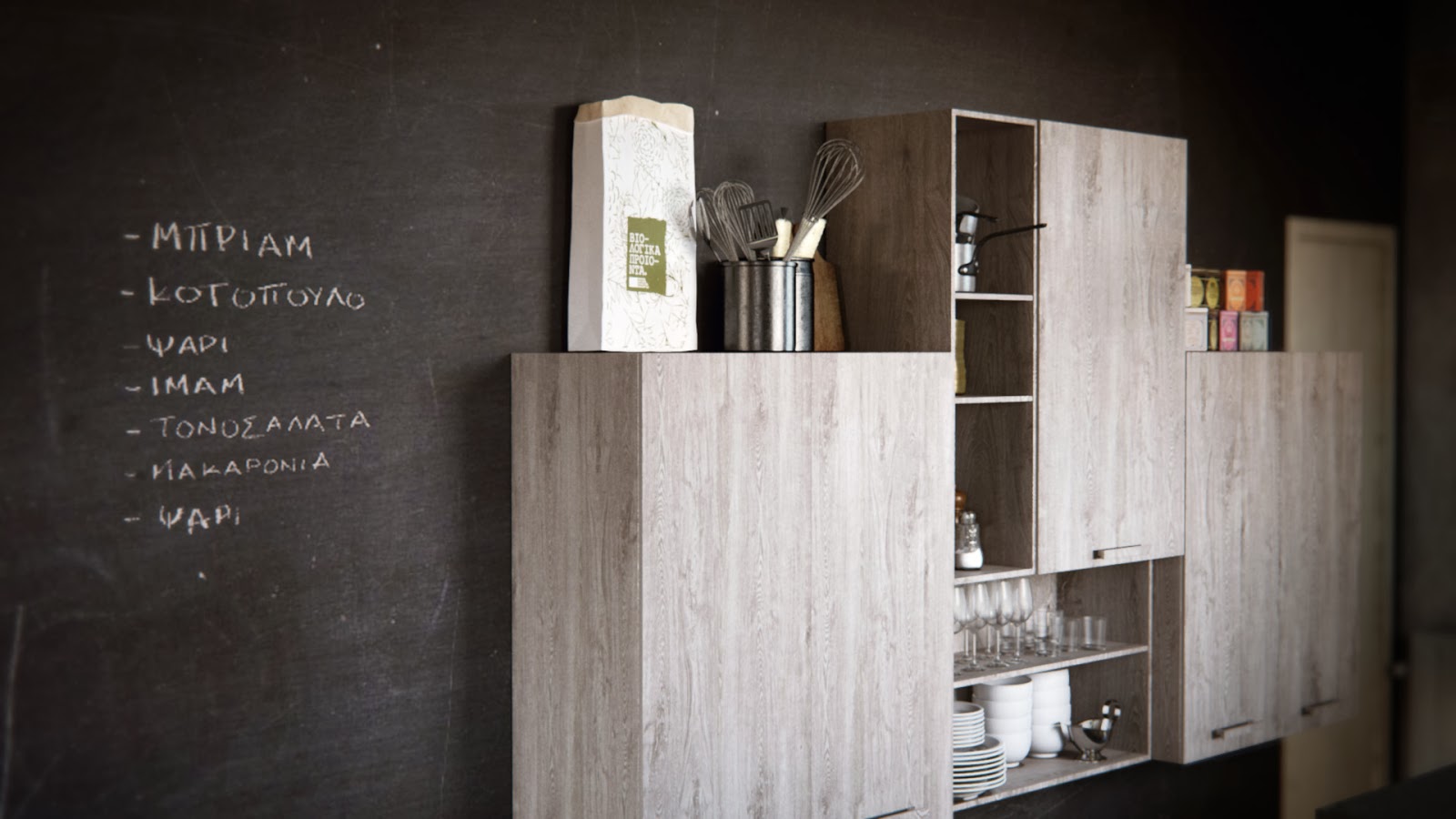
Ανακαίνιση κατοικίας δύο ατόμων στον Βόλο από την διακοσμήτρια Μαρία Μαυρογιάννη. Vintage-industrial look concept, συνδυασμός κλασσικού και σύγχρονου βιομηχανικού στυλ με χρήση παλαιομένων επίπλων και ρετρό διακοσμητικών στοιχείων.
Η μοντελοποίηση των οργανικών στοιχείων έγινε στο max με τον cloth mod της nvidia και στο clo3d.


Η μοντελοποίηση των οργανικών στοιχείων έγινε στο max με τον cloth mod της nvidia και στο clo3d.




Πέμπτη 2 Ιανουαρίου 2014
Duplicating views while keeping linework
When duplicating a view in Revit using the duplicate or duplicate with detailing command the newly created view does not keep the linework made to the parent view. In order to copy a view and keep all the detailing and linework made we follow this two step procedure: first select the view you want to copy, right-click select duplicate view and duplicate as a dependent and then select the newly created dependent view, right-click again and select convert to independent view.

Στο Revit όταν θέλουμε να αντιγράψουμε ένα view χρησιμοποιούμε την εντολή duplicate ή duplicate with detailing, και στις δύο περιπτώσεις όμως δεν αντιγράφεται η drafting πληροφορία που έχουμε δημιουργήσει με την εντολή linework. Για να διατηρήσουμε τις αλλαγές που έχουμε κάνει στην εμφάνιση των γραμμών με την linework επιλέγουμε πρώτα το view και με δεξί κλικ κάνουμε duplicate view - duplicate as a dependent και μετά επιλέγουμε το dependent view που δημιουργήθηκε και με δεξί κλικ πάλι επιλέγουμε convert to independent view.

Στο Revit όταν θέλουμε να αντιγράψουμε ένα view χρησιμοποιούμε την εντολή duplicate ή duplicate with detailing, και στις δύο περιπτώσεις όμως δεν αντιγράφεται η drafting πληροφορία που έχουμε δημιουργήσει με την εντολή linework. Για να διατηρήσουμε τις αλλαγές που έχουμε κάνει στην εμφάνιση των γραμμών με την linework επιλέγουμε πρώτα το view και με δεξί κλικ κάνουμε duplicate view - duplicate as a dependent και μετά επιλέγουμε το dependent view που δημιουργήθηκε και με δεξί κλικ πάλι επιλέγουμε convert to independent view.
Κυριακή 15 Δεκεμβρίου 2013
Revit Dynamo
O Zach Kron έχει ξεκινήσει την εξέλιξη του Dynamo το οποίο είναι add on στο Revit και ανταγωνίζεται το δίδυμο Rhino-Grasshopper. Η γλώσσα που χρησιμοποιεί είναι η python και το αποτέλεσμα είναι ένα πολύ φιλικό περιβάλλον εργασίας. Το add on προς το παρόν είναι δωρεάν και μπορεί κανείς να το κατεβάσει και να το δοκιμάσει από το site της autodesk για το vasari:
http://autodeskvasari.com/dynamo
Αφου γίνει η εγκατάσταση το Dynamo βρίσκεται σto ribbon του Revit στη θέση Add-Ins:

στο youtube έχουν ανέβει ήδη πολλά tutorials και δοκιμές εφαρμογής του Dynamo.
http://www.youtube.com/watch?v=kRgmHaU4Q40
Zach Kron has started the development of Dynamo which is a Revit add on software and competes the Rhino-Grasshopper dynamic duo. The language used is python and the result is a user friendly interface. The code is free for now and you can download it from the autodesk vasari site:
http://autodeskvasari.com/dynamo
After installing you can find Dynamo in the Revit ribbon Add-Ins:
there are many tutorials and tests already uploaded on youtube .
http://www.youtube.com/watch?v=kRgmHaU4Q40
http://autodeskvasari.com/dynamo
Αφου γίνει η εγκατάσταση το Dynamo βρίσκεται σto ribbon του Revit στη θέση Add-Ins:

στο youtube έχουν ανέβει ήδη πολλά tutorials και δοκιμές εφαρμογής του Dynamo.
http://www.youtube.com/watch?v=kRgmHaU4Q40
Zach Kron has started the development of Dynamo which is a Revit add on software and competes the Rhino-Grasshopper dynamic duo. The language used is python and the result is a user friendly interface. The code is free for now and you can download it from the autodesk vasari site:
http://autodeskvasari.com/dynamo
After installing you can find Dynamo in the Revit ribbon Add-Ins:
there are many tutorials and tests already uploaded on youtube .
http://www.youtube.com/watch?v=kRgmHaU4Q40
Εγγραφή σε:
Αναρτήσεις (Atom)